User FAQs

Save money. Get meals for less. Help reduce waste

💡 What is Flash Grüb?

Flash Grüb helps you discover affordable meals from local restaurants while reducing food waste.

You can buy:

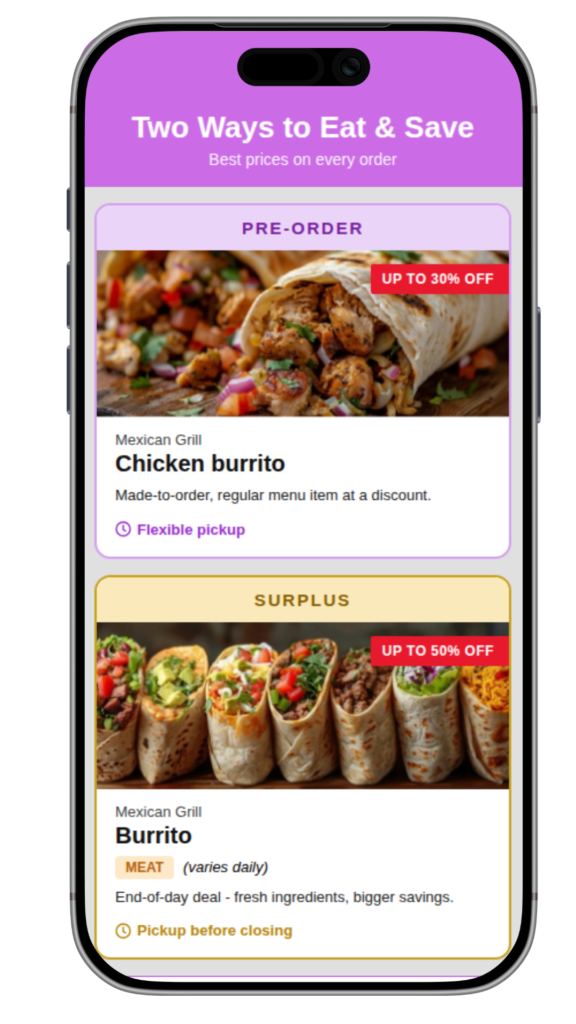
  • Pre-Order regular meal items ahead of time at a discount (up to 30% off)
  • Surplus meals at a deeper discount (end-of-day deals, up to 50% off)

Flash Grüb helps you discover affordable meals from local restaurants while reducing food waste.

🥡 Surplus (end-of-day deals)

  • Listings open daily at 10:00 PM for the next day
  • Secure your meal ahead or same-day — order at least 30 minutes before pickup time
  • Limited inventory per restaurant each day
  • Pickup is near closing time (shown in each listing)
  • You get what’s available that day


💡 Surplus meals are limited — grab yours early to avoid missing out

🍱 Pre-Order (discounted scheduled meals)

  • 🍱 Lunch
    • Order by 10:00 AM same day
    • Pickup: 11:00 AM–3:00 PM
    • Tomorrow’s orders open at 3:00 PM
  • 🍻 Happy Hour
    • Order by 2:00 PM same day
    • Pickup: 3:00 PM–5:00 PM
    • Tomorrow’s orders open at 5:00 PM
  • 🍽️ Dinner
    • Order by 5:00 PM same day 
    • Pickup: 6:00 PM–9:45 PM
    • Tomorrow’s orders open at 10:00 PM


💡 Pre-orders let you plan ahead and secure exactly what you want across lunch, happy hour, and dinner

Your Wallet is used to pay for meals.

  • Add Wallet Balance anytime using your card, Apple Pay, or Quick Reload
  • Check out faster with your saved Wallet Balance
  • Get alerted when low — reload instantly with one tap

Quick Reload lets you instantly add money to your Wallet when your balance is low — so your order goes through without interruption.

How it works:
• If your balance is low at checkout, you’ll be prompted to reload
• Choose an amount: $20, $30, $40, or $50
• Money is added instantly and your order continues

Good to know:
• You only add money when you choose to
• No automatic top-ups
• Added money stays in your Wallet until used

Yes. Use your Wallet Balance and pay the rest with a credit card, debit or Apple Pay. No reload needed. Your card is only on hold until the 15-minute cancellation window ends. Cancel within 15 minutes and your Wallet Balance is returned instantly and the hold is released.

Your Wallet Balance never expires while your account is active.
Promotional credits may have expiration dates.

Yes! You can cancel your order within 15 minutes of placing it for a full refund to your original payment method, whether you paid with Wallet Balance, a credit or debit card, or Apple Pay.

After 15 minutes, all sales are final because the restaurant may have started preparing or reserving your food. This policy helps restaurants prepare efficiently and reduce food waste.

Please note: Quick Reload transactions are processed immediately and cannot be cancelled once completed.

At the restaurant, scan the store’s unique QR code using the Flash Grüb app.

A confirmation screen will appear and you will show it to staff to receive your meal.
This screen expires after 5 minutes so scan when ready to pick up your order.

We send reminders 30 minutes and 15 minutes before pickup (if notifications are on).

Contact support as soon as possible if you’re unable to pick up.

Not yet.

Flash Grüb is pickup-only.
Pickup times are shown in each order.

We accept:

  • Credit cards
  • Debit card
  • Apple pay


💡 Wallet checkout is faster.

Flash Grüb connects you with surplus and pre-order discounted meals from participating vendors. All items are prepared and handled by the restaurant or vendor directly. For specific questions about ingredients, allergens, or food handling, we encourage you to reach out to them directly.

Surplus meals are end-of-day items available in limited quantities. Pre-Order meals are select discounted regular items that may vary daily.

Yes. You can manage:

• Order updates

• Pickup reminders

• Quick Reload alerts (low balance notifications)

You can delete your account anytime from Profile → Delete Account.

If you have Wallet Balance remaining:
Your Wallet Balance is yours to use. Before deleting, you have three options:

  • Spend Balance: Use your remaining balance toward your next meal
  • Keep Wallet Active: Your balance never expires while your account is active.
  • Contact Support: Reach out if you need help

If you delete with a remaining balance, it will no longer be accessible and handled per New York unclaimed property law.

If your balance is $0:
Go to Profile → Delete Account. You’ll get a confirmation email before permanent deletion.

Using Sign in with Apple?
Check your relay email (Settings > [Your Name] > Sign in with Apple) if you don’t see the confirmation.

Note: Account deletion is permanent and cannot be undone.

Yes, in many cases. 529 funds can generally cover meals for students enrolled at least half-time, up to their school’s published room and board allowance. Your Wallet reloads and Quick Reloads come with emailed receipts to help document your meal expenses. Check with your 529 plan administrator or school for your limit.

Add their email in your app Profile > Personal Information. We will auto-forward all reload receipts so they can claim direct deposit payouts from their 529 portal.

Check the “I manage my own 529 account” box in your profile and leave the parent email blank. Save your emailed receipts to claim payouts directly from your dashboard.

Chat with us in the app, either on your Order Details screen or in your Profile, or email support@flashgrub.com. If your order wasn’t fulfilled or you were charged twice, we’ll make it right.

Save money with Flash Grüb

Your wallet will thank you twice!
Unlock exclusive deals from local restaurants in two ways, all in one app.

Pre-Order Made-to-order meals you order ahead and save up to 30%.
Surplus Fresh meals available at the end of the day, save up to 50%.